


This page gives you an overview of the TrackMate ratings, what they mean and how to understand them. The ratings are colour coded for ease of use, eliminating the need for confusing tables of numbers and unnecessary racing jargon.
Assuming you have already familiarised yourself with the race card, it is time to have a look at the ratings. If you need to know more about the race cards then have a look at the ADD LINK TO RACE CARD INFO PAGE page.
This is a list of what this page includes:
- Rating Colours Explained – Understanding what the colours represent.
- Speed Ratings – Incredibly accurate and unique speed ratings.
- Edge Ratings – Totally unique ratings created using our amazing evolutionary algorithm.
- Interactive Ratings – Customise the ratings as you see fit.
Rating Colours Explained
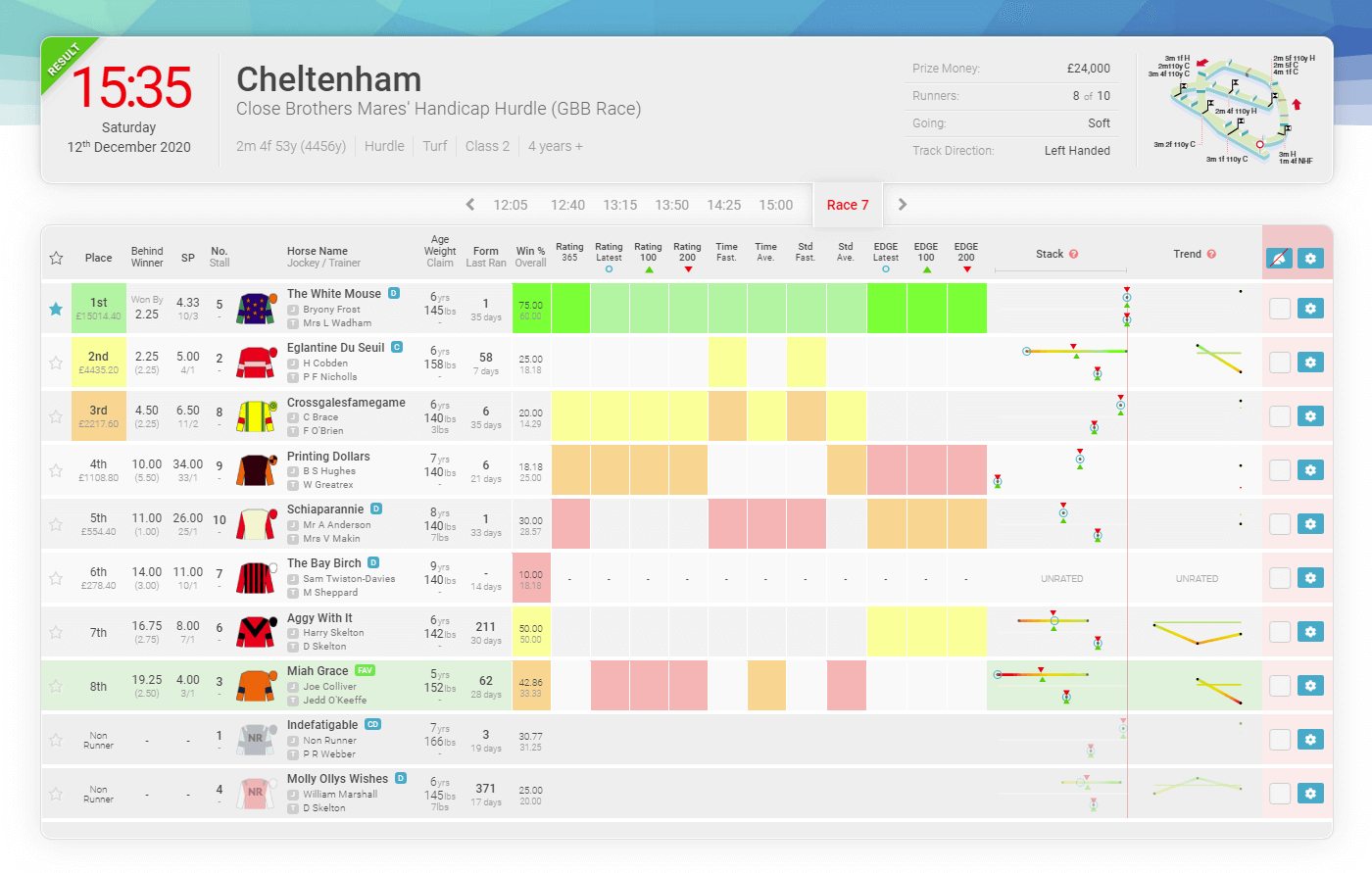
We need to start with explaining what the rating colours mean before trying to explain anything else. TrackMate race cards display the top 3 rated and bottom rated horses in a traffic light style colour scheme as shown below.
Bright green is “Clear Top” meaning they are rated comfortably ahead of 2nd best. Green is “Top Rated” but not by a comfortable margin like clear top would be. “2nd”, “3rd” and “Last” rated continue in a familiar traffic light colour scheme.
Horses rated “in the middle” are grey or have no colour as are horses without a rating. We only rate the top 3 and bottom as we do not need to know which horse is rated 7th and would void the point of our rating colours. If you hover over the rating boxes you will see the numerical rating. This will not be visible if the horse has no relevant rated form for the qualifying period.
Now you understand what the different colours represent… let’s move on to the ratings themselves.
The Ratings
There are two ratings systems; the TrackMate Speed Ratings and the TrackMate unique EDGE Ratings. Each column for both sets of ratings are colour-coded to help simplify reading the race cards.
Speed Ratings
The first 10 ratings boxes are the TrackMate Speed Ratings calculated using our advanced algorithms and unique racecourse standards. Ideally, you are always looking for these boxes to be as well coloured as possible. Remember… green is best.
The TrackMate race cards display all the rated relevant runs (up to the last 8 runs) in a 200 day period We produce a speed rating for every run and the final speed rating is the average of all ratings combined.
Win Percentage
There are two percentages in this column. The top percentage is the win rate from for this exact type of race and the bottom is the overall win rate from all qualifying races.
Rating 365
This TrackMate average Speed rating is for the previous 365 days before the current race card you are viewing. We concentrate mostly on recent form so this rating indicates potential dangers from runners who have little or no form in the current season.
Rating Prev
TrackMate average Speed rating for the current time period in the previous season. This rating is most helpful for runners who have little or no form for the current seasons latest, 100 or 200 periods, like with Rating 365 but over a shorter period.
Rating Latest
The latest speed rating achieved by this horse. Very often an important indicator of the horses current form. A good speed rating for its latest run means that the horse should be fit and well and that the conditions of that last run suited the horse. This rating is also indicated on the stack as the blue circle.
Rating 100
This is the TrackMate Speed rating for this horse averaged over the last 100 days. The best indication of recent form. The more runs the more accurate this rating will be.
Rating 200
A slightly longer-term speed rating. This Rating is the overall Speed rating for the last 200 days. A good indicator of the horses’ consistency.
Fastest Time
The best time rating achieved in the last 200 days.
Time Average
This rating is achieved using our standardised race distance and represents the horses’ average time over said distance.
Standard Average
The runners average time from the TrackMate standard vs field.
Fastest Standard
This is the closest this runner has come to the TrackMate course standard time for this distance.
It is not always the fastest horse that wins a race nor does it have to be. Some horses win races easily so do not run as fast as they could at the end of the race simply because they don’t have to. Well beaten horses will often leisurely cross the line in 10th place without a care in the world.
Only good horses can run good times, but both good and bad horses can run bad times.
The TrackMate Team
In the scenarios above, no speed rating system can accurately rate this type of run.
TrackMate speed ratings are no different and it would be ridiculous for us to claim otherwise. What we do claim however is that we believe that they are about as good as it gets.
EDGE Ratings
The last 3 boxes are the TrackMate Edge Ratings calculated using TrackMate’s unique algorithms.
The TrackMate Edge Rating is the result of many years of development. The unique evolutionary algorithms run simulations with thousands, if not millions of iterations per race. Making EDGE a very powerful tool.
The EDGE ratings are completely different from the speed based ratings and sometimes they will have conflicting assessments of a race. Being a form-based rating, the edge will sometimes find form lines that are better than the rest of the field but the speed ratings do not agree.
EDGE Latest
The most recent edge rating achieved.
EDGE 100
The Edge rating for the last 100 days.
EDGE 200
The edge rating over the last 200 days
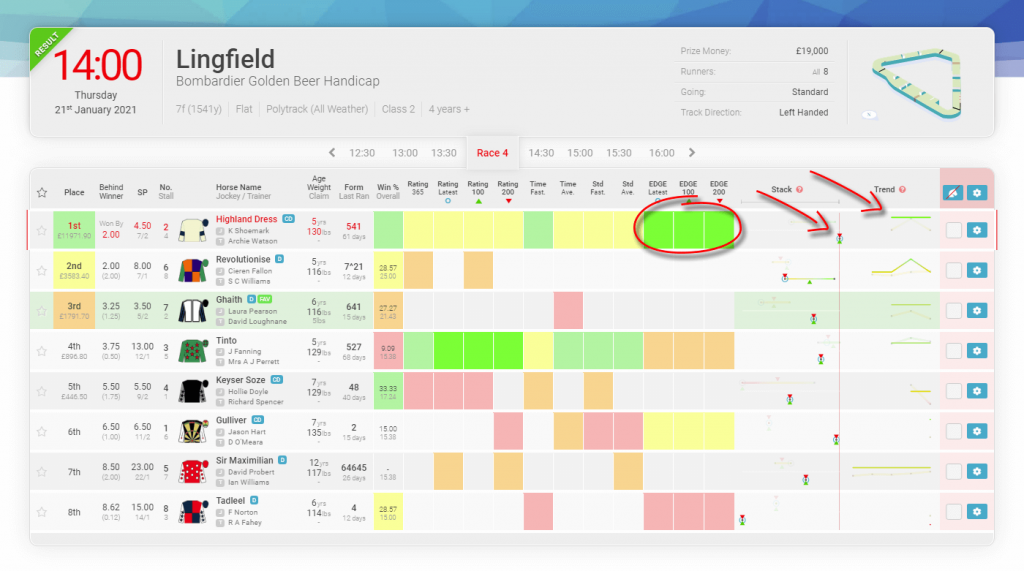
The race card shows that the EDGE ratings have the winner “Highland Dress” as the clear top rated horse in the race. Ideally, we would look for some backup from good speed ratings but it is not always the case.
Using the Stack and Trend are a couple of ways to back up the ratings.
Interactive Ratings
If you feel that one poor race is ruining a rating, the interactive race cards give you the ability to “forgive/ignore” this run by removing it from the race card. This will improve the rating.
This feature is available by clicking on the trend point for the race you want to remove and then the remove race option is in the pop-up.
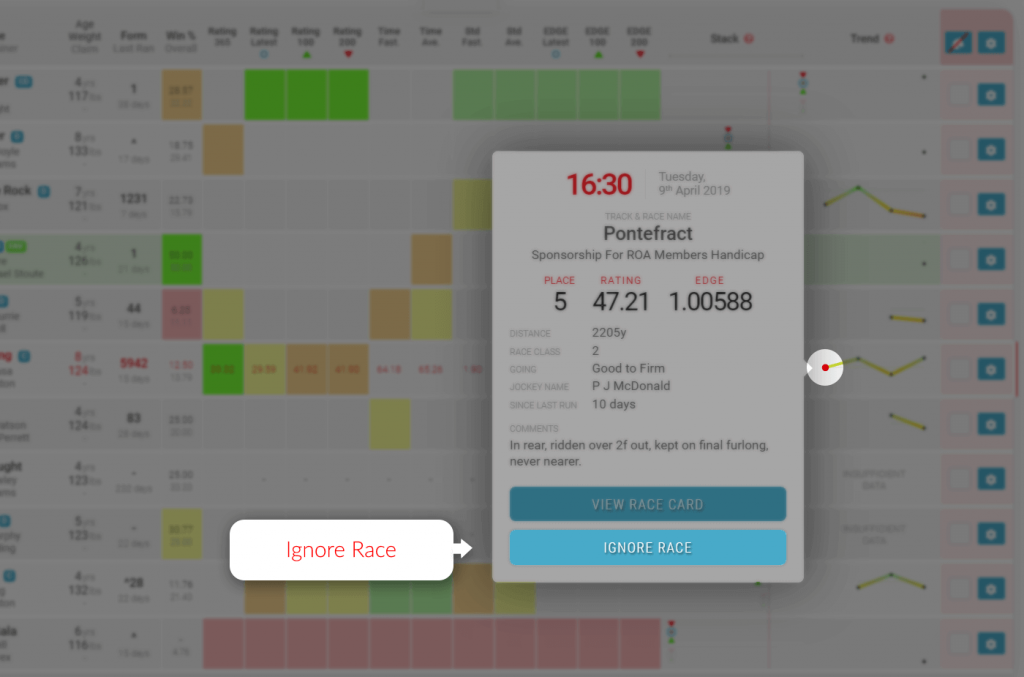
Equally, if you feel that as a horse has had only one really good run this season which might be enhancing a rating then you can also remove that run and re-rate the race.
You can also remove a runner from the race card completely as if it wasn’t running at all. Please see our Race Card Filter guide for more information on how to use the interactive race card options.