All websites need a myAccount page, and TrackMate is no different. You will find all your personal details, customisable settings, subscription information and also your transaction history.
Your personal details were gathered during registration and you can add/edit them here on the myAccount page.
Usage Statistics
This section of the myAccount page contains all your useful usage statistics like; how many race cards you’ve viewed, how many horses you are tracking using myTRACKER and how many slips you have in your mySLIPS.
Customisable User Settings
These settings are customisable so you can setup TrackMate you way you like it. Look for this button which will open the settings popup. There are a selection of settings you can personalise like; change how mySlips displays predicted profit/return and race card filter leeways. Create a TrackMate system that suits you as we add more settings over time.
Subscription Information
This shows you all TrackMate membership options and also which one you are currently subscribed to. Here you have the ability to start and upgrade your membership.
Everyone who registers with TrackMate will automatically receive a “Free” account. You’ll have access to view the daily “FREE Card” which you can find on the myTrackMate page and also have the ability to view the previous days cards with results. You will need to subscribe for one of our Trackmate membership subscriptions to gain full race card ratings and live filter access.
You can also view all our membership subscription options and special offers on the membership page.
Transaction History
All of your current and historic subscription information can be seen here, and if you required you can also cancel your membership subscription here.
The myTrackMate page is a personal homepage, a one-stop page where all your race card interactions are saved so you can see all your activity in one place. Everything from myTRACKER to mySLIPS and your betting history and statistics. Read on for full explanations for each feature and how to use them.
Here is a full list of the “myTrackMate” page features:
Live Race Cards – Access to all today’s race cards and ratings.
History Race Cards – Access to 5 years of historic race card ratings and results.
TrackMate refers to all races which haven’t run yet as “Live” and are visible for all members. There is a link to today’s live cards in the sidebar options menu which looks like this .
FREE Account Members will only get to see ratings for one card a day selected by the Trackmate Team (see Today’s FREE Race Card below) whereas Subscribing Members will get ratings on all “Live” cards as well as the uses of the Race Card Filter features.
Historic Race Cards
TrackMate refers to all races which have results as “Historic“. There is a link to historic cards in the sidebar options menu which looks like this .
All members will have access to over 5 years of historic race card ratings making it a quick and simple to check and process results. These results and ratings are the perfect way to backtest your systems and strategies. Additionally, all subscribing members will have access to the Race Card Filters feature. Normally this is used alongside your systems on live cards, but it is also a very powerful tool you coan used to test your systems on historic cards.
Race Card of the Day (Today’s FREE Race Card)
The sidebar options menu also has a link to the race card of the day which looks like this . This race is selected daily from that day’s race cards by the TrackMate team.
Normally it is a race of interest or just a race we feel should be highlighted, but can also be used for competitions and alike to identify a particular race. This button is only visible to subscribing members, if you are a FREE Account Member it will look like this instead and is the only live race card available with ratings. It is usually the same race card selected for all members, unless stated otherwise.
myTRACKER
myTRACKER is a list of all of the horses you have selected to keep an eye on. They are highlighted on every race card that horse has/will run in so they’re easily identifiable. You can also add/edit notes like why you selected this horse for each.
How to add a horse to your myTRACKER
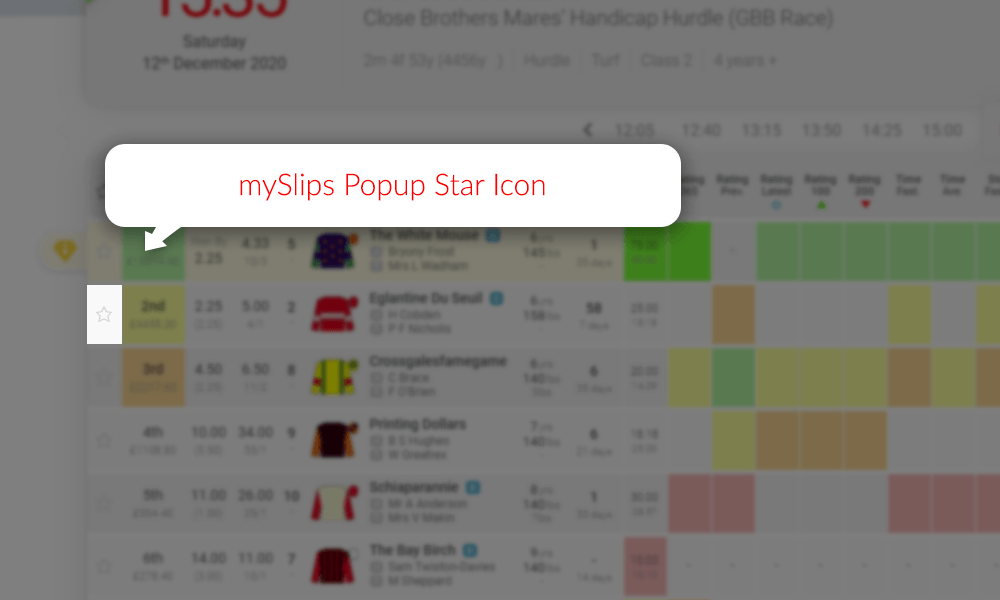
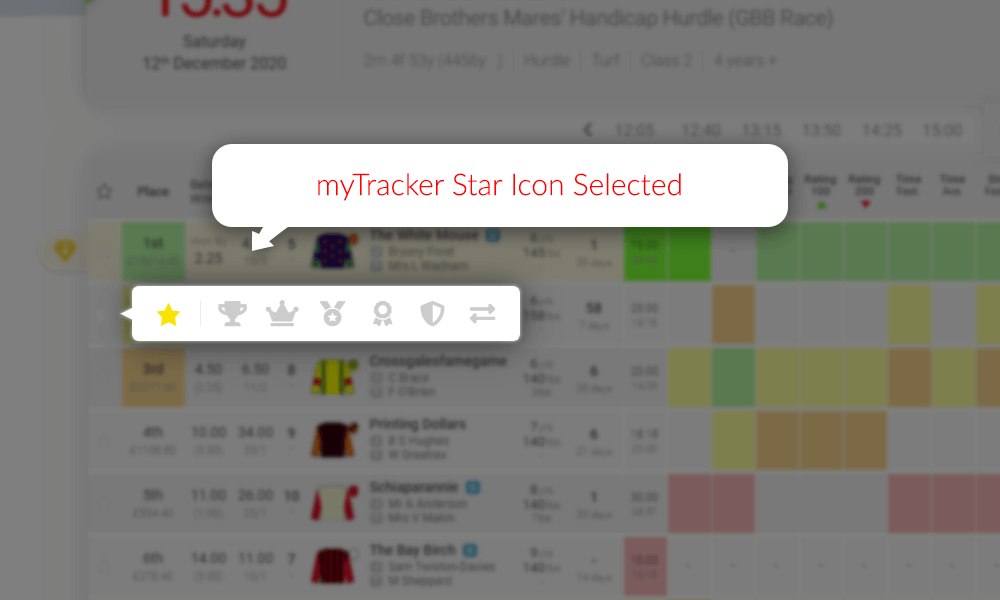
When you click on the star icon to the left of any runner on a race card you will see a selection popup.
The star icon popup menu button is grey when the horse isn’t selected.
In the popup click on the star icon to add that horse to your myTRACKER.
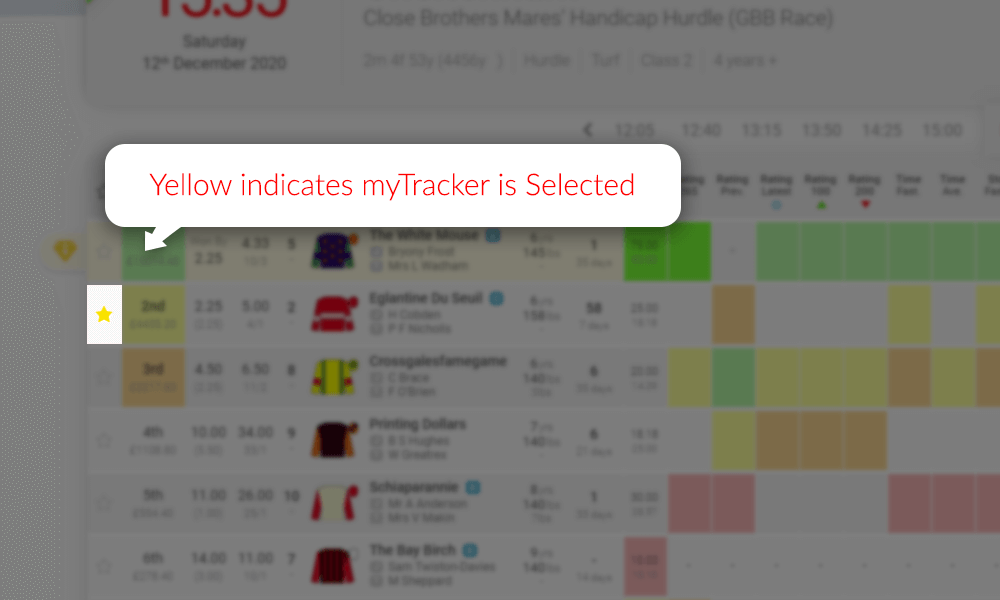
Selected icons will change colour when successfully selected.
When you click on icon it will change to yellow to identify your selection. At the same time a simple form will dropdown so you can add notes. These notes will be available for you at all times from the race card or your myTrackmate myTRACKER section.
Notes will popup when you click the icons, or when you hover over a selected icon.
Your myTRACKER horses are highlighted on race cards
Horses added to your myTRACKER will change the star icon on race cards to yellow to highlight that this horse has already been added to your myTRACKER selections.
The star icon will have a blue border if you have added this horse to mySlips.
mySLIPS
Tracks your bets and logs them in your personal myTrackMate database.
Automatically calculates profits/losses and stores the data.
See your stats for today, the last 7 days, the last 30 days or all historic bets.
Track your win rate.
Auto updated ROI calculations.
Make notes in your MySlips.
Test your systems before you jump in by monitoring your selections statistics before you bet for real.
Use either fractional or decimal odds for your stats.
The TrackMate System will auto stake all bets from your mySLIPS with £2 stakes and use the SP as your odds unless specified in your slip.
Statistics and bankroll management software.
Another great feature we offer our members is the mySLIPS bet tracking software. When you find a horse that you are interested in having a bet on, simply click on the next to the horse’s name and save it in your mySLIPS which will then be visible on your mySLIPS section on your myTrackMate page. This process is the same as selecting a horse for myTRACKER (see explanation and image examples above in the myTracker section)
The bet tracking feature is the ultimate way to track your success and implement great bankroll management skills which will improve your profitability immediately.
The Trackmate Team
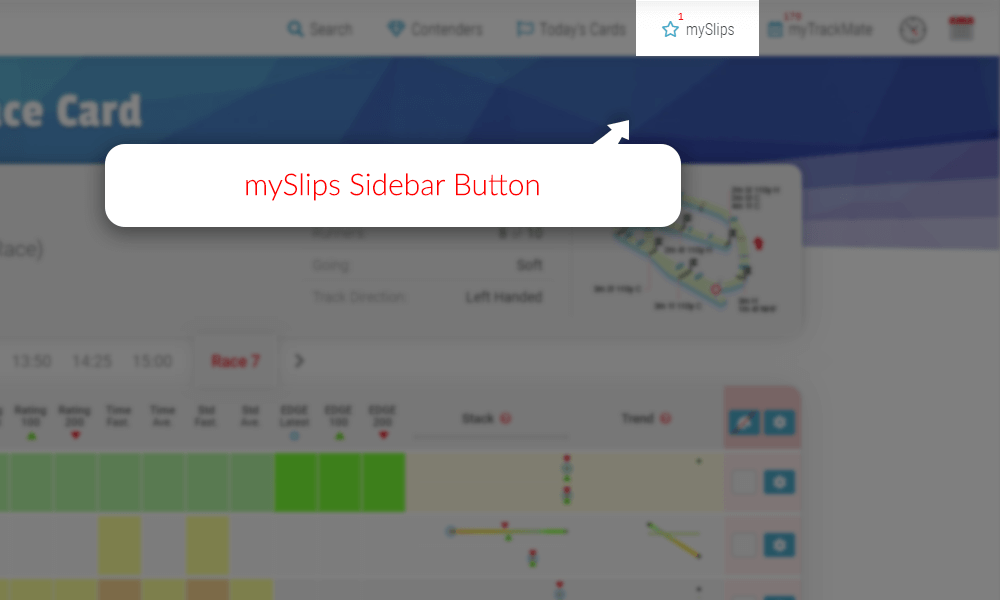
When logged in as a registered TrackMate member you will see the members infobar under the main menu. On the members infobar you will see the button which opens the mySLIPS sidebar.
The red number above the button represents how many slips you have in your mySlips.
When you have selected a bet type for a horse from a race card it will automatically be placed in this mySLIPS sidebar. When open you will see a list of all your selected horses where you can enter your odds, stakes and bonus places.
This example shows the horse The White Mouse slip in mySlips.
When you hover over the slip it will partially expand so you can see more info without having to select it. This is useful when you have multiple slips.
The White Mouse when you hover over it.
When you click on a slip it will fully expand. There are inputs on every mySlips slip which allows you to add the odds you have taken for your bet, which can be added as either fractional or decimal formats, the stake you would like to place and if your bet includes bonus places. The slip will automatically log your bet details, calculate your total stakes and predicted return/profit. You can choose if you’d like to see predicted return or profit in the settings on your myAccount page.
Edit “Odds” and “Stake” for each bet type and it calculates the predicted return/profit for you.
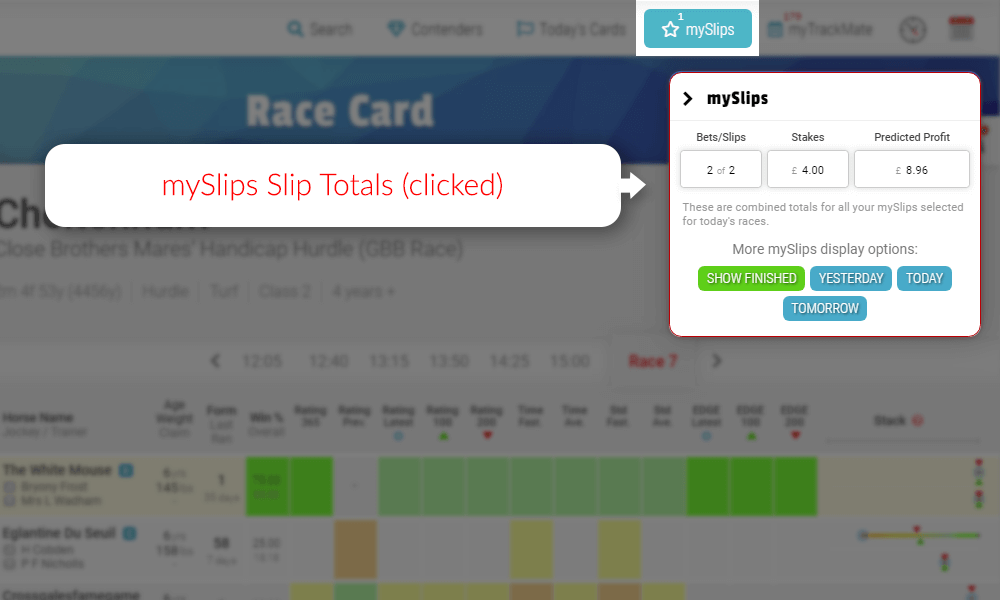
You can check the total stakes and predicted return/profit for all the slips combined by clicking the “Current mySlips” header above the slips. This example says Current mySlips because the period has been set to “Race Card” as will be explained next.
mySlips slip totals worked out for you.
You can also decide what content period you would like the mySlips sidebar to show you. This example is set to “Race Card” which will only show your slips for the race card you are currently on. The title of the mySlip header will change depending on your selection. The selection is saved and will be used until changed again. Other options are “Yesterday” to only see yesterday’s slips, “Today” to only see today’s slips and “tomorrow” to only see what you have picked out for tomorrow’s races.
Your myTrackMate data is automatically transferred to this page and will track your statistics for; wins, losses, win rate (%) and even your return on investment (ROI).
Race Card Adjustments
View all your ignored/removed runners.
View all your ignored/removed runs.
Edit ignored/removed notes.
Remove/Reinstate/Reset runners and races back to their race card.
Your myTrackMate page also allows you access to your personal database of horses and races you have ignored or removed. MyTrackMate Race Card Adjustments can be reinstated or leave them stored in your personal database.
TrackMate 7 day Support
You’ll also find a support link/button in the options menu for 7 days a week support from the TrackMate Team. The support button looks like this .
If you need additional information or help using any feature, please use this link rather than the standard contact form. This support team link connects you directly so will get your requirements dealt with a lot faster.
The TrackMate race guides have been designed in such a way to be easy to read and easy to understand. Below are some examples of real race card ratings and how to easily start to pick winners.
The “Value Bet” – Looking for well-rated horses at big prices.
The “Lay Bet” – Be a bookie and “take one on”. Poorly rated favourites worth laying.
Rating Colours Explained
We need to start with explaining what the rating colours mean before trying to explain anything else:
Clear Top
Top Rated
2nd Rated
3rd Rated
4th Rated
Rated Last
No Colour
Non-Runner
–
Not Rated
Now you understand what the different colours represent… let’s move on.
How should I be using TrackMate?
There are many ways to use the TrackMate system and many ways to read the “picture” created by the colour-coded ratings integrated into the card.
It can be used as your only method of selection or in conjunction with your own race reading abilities and knowledge of form. Both are extremely powerful.
Remember, you do not have to bet in every race.
The TrackMate Team
Waiting for the right opportunity and most importantly, waiting for value is the key to success.
Here are some examples of the type of picture you may come across:
The “Messy Race”
Sample “Messy Race” – 3rd August 2019, Hamilton at 5:50pm
In this race card example, you can see that the colours (ratings) all over the place. Nothing stands out as any better than the others because the colours are spread out across all of the runners.
With this type of picture we would normally just move on to the next race… but is it worth a closer look? There might be an opportunity lurking somewhere. We are looking for a well-rated horse that represents good value.
Can we clean up/filter the card and spot some value?
Check the going settings in the Race Card FIlter match today’s conditions.
Rate less runs. You can rate 3, 5 or 8.
Filter the remaining runners for Surface, Ground and Distance perhaps?
If after exhausting all options you do not find an obvious or good value selection just move on to the next race.
You do not need to find lots of selections. Just well rated and good value ones. If there are none that day, be patient, there will always be another race and another… and another!
The “Standout Selection”
You will see from this race card picture that there is an obvious contender. It is not hard to spot… green is good!
Sample “Standout Selection” – 12th December 2020, Cheltenham at 3:35pm
The obvious horse to choose in the race above was “Bay Of Naples“. This picture indicates that the horse is:
Clear top-rated in “Rating 365”, “Rating Latest”, “Rating 100”, “Rating 200”, “Edge Latest”, “Edge 100” and “Edge 200”.
Top rated in “Win %”, “Fastest Standard” and “Average Standard”.
The stack best rating is top as is the stack latest.
Everything you want in an investment based on the TrackMate ratings.
The “Value Bet”
Sample “Value Bet” – 20th January 2021, Southwell at 6pm
In theory all your bets should be value bets. The race example above is from this year’s ultra competitive Lanzarote hurdle and amazingly the winner “Boreham Bill” was totally unfancied at an incredible price of 66/1 and even bigger on the exchanges!
In a scenario like this we would prefer the 80% to place and 20% to win staking strategy.
In a big race like this one you will be able to obtain prices for as many as 6 places on the exchange.
The “Lay Bet”
Sample “Lay Bet” – 5th January 2019, Kempton at 5:15pm
To those of you already familiar with the betting exchanges you will be aware of laying horses. It is essentially acting as the bookmaker and laying odds against the horse winning.
In the above example the favourite “Luxford” looks like terrible value based on the TrackMate ratings and could potentially be the sort of horse you might want to lay on the exchanges.
ALWAYS be cautious when using this function on an exchange. Make sure you understand betting exchanges before you attempt to lay horses.